Safe Flight Guide: calm routines for responsible drone operation
This guide is built around repeatable checks: airspace awareness, weather reading, return-to-home settings, battery headroom, and a clear go/no-go decision. It is written for learning and outdoor photography—never for monitoring people.
Educational guidance only. Always follow local rules, site permissions, and your drone manufacturer’s safety documentation.
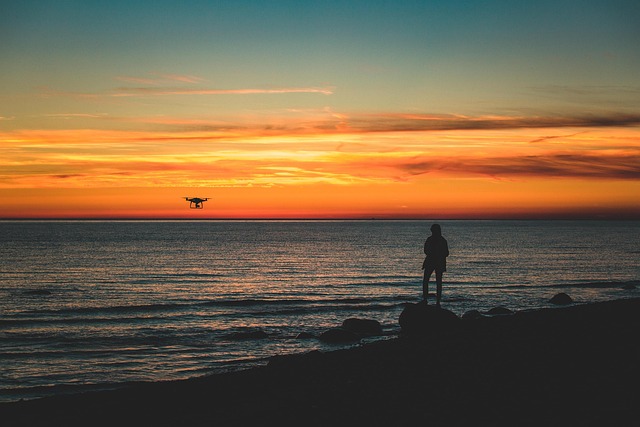
If anything feels rushed—crowds nearby, changing wind, or uncertain airspace—pause and reassess. Most safe flights start with the decision to wait.
The safety-first approach
Safe flying is less about skillful stick work and more about methodical preparation. The drone is a small system of constraints: battery chemistry, GNSS reception, radio link quality, wind, and a camera that can tempt you to focus on the shot instead of the aircraft. This guide turns those constraints into simple prompts you can repeat, even on a busy weekend or during a cold coastal walk.
We recommend thinking in three phases: pre-flight (everything you can check before the motors start), in-flight (how you keep options open), and post-flight (what you record so the next flight is safer). In technical terms, you are reducing variance: fewer unknowns, fewer surprises, and fewer last-second decisions near trees, cliffs, or buildings where GNSS multipath and wind shear can appear.
The guide stays away from intrusive use cases. We focus on outdoor exploration, aerial photography, and mapping practice where the priority is predictable operation, good site etiquette, and safe distance from people and wildlife.
Field checklist: what to confirm before lift-off
Use this as a short, written sequence. If a step fails, stop and fix it—do not “see what happens.” A calm checklist is faster than a rushed recovery.
Site, airspace, and people
Confirm the launch point is suitable: clear take-off and landing area, no overhead wires, and a safe buffer from bystanders. If you are near paths or viewpoints, assume someone will step into your space. Choose a spot that keeps the aircraft well away from people throughout the flight.
Airspace awareness matters even for short flights. Check whether the location is appropriate and permitted, and avoid any area where you cannot maintain a safe, controlled operation. If you are unsure, treat it as a no-go.
- Clear take-off/landing zone, safe distance from people
- No wires, cranes, or sudden obstacles in the flight corridor
- Permission and local rules confirmed before you power on
Weather: plan for gusts
Wind is the hidden difficulty for beginners. Look for gusts, rapid direction changes, and turbulence near cliffs, tree lines, and buildings. A “fine” forecast can still feel difficult at rotor height.
If the aircraft is already leaning hard in hover, you are spending battery just to hold position. That is your early warning.
Battery headroom
Treat battery percentage as an estimate, not a promise. Cold weather, wind, and aggressive climbs change the curve. Plan an early return so you are not forced to land in a poor spot.
The safest landing is the one you choose, not the one that happens to you.
Home point and return-to-home settings
Confirm the home point is recorded correctly before you fly away. Then set a return-to-home altitude that clears obstacles in the area. This matters in parks with tall trees, urban edges, and sites with uneven terrain.
If GNSS reception is poor or the app warns about compass calibration, slow down. GNSS multipath near buildings can cause position drift. It is better to keep the aircraft close and land than to push distance.
Link and firmware sanity
Before you launch, confirm a stable video feed and that your controls respond normally. If the app shows unusual warnings, do not “test it in the air.” Fix it on the ground.
In-flight habits that keep options open
Once airborne, safety comes from preserving margin. Margin is battery, distance, height, and attention. The most common beginner error is “one more shot,” where the aircraft is far away, wind increases, and battery drops faster than expected. A simple rule helps: if you feel uncertain, you are already late—start the return while you still have choices.
Aim for predictable movement: slow forward speed, gentle yaw, and smooth changes in altitude. These habits reduce sudden control inputs that can confuse orientation. They also improve image quality by reducing motion blur and rolling shutter distortion.
-
01
Keep a conservative flight box
For practice flights, stay close enough that you can re-orient quickly if the camera view becomes confusing. Do not use distance as a substitute for planning.
- Maintain line of sight and a comfortable return distance
- Avoid flying behind trees, cliffs, or buildings that can block the link
- Prefer wide, open areas until your routines are automatic
-
02
Read warnings as information, not noise
Treat on-screen warnings as a prompt to simplify the flight. If you see GNSS or compass issues, reduce distance and complexity. If the link quality drops, climb slightly only if it improves line-of-sight and remains safe.
- GNSS drift near buildings may indicate multipath
- Obstacle sensing has blind spots and is not a safety net
- Wind warnings are often late—act early
-
03
Return with battery margin
Do not plan to “use the whole battery.” Plan to finish early and land with margin. In wind, the return leg may take longer than the outbound.
- Start returning when you still feel comfortable, not when the app insists
- Choose a calm landing approach and avoid rushed descents
- If uncertain, land in the nearest safe, empty area
-
04
Respect wildlife and sensitive sites
Environmental awareness is a practical safety skill. Birds can react unpredictably, and sensitive habitats deserve distance. Keep flights short, quiet, and non-intrusive, and avoid hovering near wildlife.
- Keep distance, do not chase movement for a shot
- Avoid nesting areas and crowded viewpoints
- If wildlife reacts, increase distance and land
Common safety mistakes (and the quiet fix)
Most incidents come from a pattern: small uncertainties stack up, and the pilot keeps going because nothing has failed yet. The fix is usually unglamorous: reduce distance, slow down, and land early. If you build these habits during calm practice flights, they appear automatically when a flight becomes messy.
Mistake: launching before the home point is confirmed
Quiet fix: wait for a stable home point and confirm it in the app before moving away. If the aircraft cannot reliably record the home point, keep the flight close and short, or land and reassess.
Mistake: trusting calm conditions at ground level
Quiet fix: watch treetops, clouds, and sea texture. If the aircraft struggles to hold position, reduce range and avoid complex manoeuvres. Wind at height is often stronger than it feels at your feet.
Mistake: chasing the shot into a crowded area
Quiet fix: choose locations that support safe distance from people and clear approaches for landing. If a site becomes busy, end the flight. Great images are not worth unpredictable risk.
Quick reference: a safe default set
Beginners benefit from conservative defaults. Use manufacturer recommendations first, then keep settings stable until you understand the effect of each change. The goal is predictability, not optimisation.
Set a height that clears local obstacles with margin. Re-check it when you change locations, especially near trees, slopes, or buildings.
Fly slower than you think you need. Slow movement gives you time to interpret warnings, maintain orientation, and keep the shot without abrupt control inputs.
Record wind feel, warnings seen, battery behaviour, and what you would change next time. These notes turn guesswork into learning.
Contact about safe flight learning
If you want a second opinion on a location, a return-to-home setup, or a safe practice routine for aerial photography, send a message here. Include the drone model and the type of place you fly (coast, hills, parks, or urban edges). We typically reply within 1 business day. We do not sell personal data, and we use your details only to respond to your request.
What we will ask (and what we will not)
- We may ask about the site type, obstacles, wind exposure, and the kind of flight you plan (practice, photos, or a mapping grid).
- We may ask what warnings you have seen in the app and whether the home point and RTH altitude were set.
- We will not ask for government IDs or financial account details through this form.
Build a safe routine before you chase better footage
If you are moving from casual flights into aerial photography or mapping practice, we can suggest a learning sequence that keeps risk low and confidence high.